Thursday, February 26, 2015

Tournament of Books

Get ready for the Tournament of Books, a March Madness style book competition. Sixteen books will compete for the championship title, but only one book can win.

The sixteen most popular books this year (according to library circulation) are:

These sixteen books will compete head-to-head against other favorites, until we narrow the field down to one champion. You will notice that many of these titles are one book in a series. For this competition, any book in the series will count toward voting. The official tournament bracket will be posted outside of the cafeteria. Watch the bracket for voting dates and results.


Please share this video with your students and read the rules of competition at the bottom. The competition begins on March 6th and will end with the final battle on April 7th.


Rules of Competition:

  • Voting will take place on specified dates.
  • The link will be on the GRIS webpage.
  • You must have read both of the books that are facing off to be eligible to vote.
  • If the book is a part of a series, any book in the series will count.
  • Voting will close at 4pm each day.
  • Results will be posted the following day.
  • Look for these books in the library. 
  • The battle will begin March 3rd.


Tuesday, February 17, 2015

TCEA Takeaways Cont.

from Keri

After being at TCEA for three days, there is no way that I can just share one thing! While in Austin I learned SO much, from differentiation with technology to gaming in the classroom, it's hard to digest it all. However,  I would say that the most valuable thing I learned while I was at TCEA with 17,000 other educators was COLLABORATION! I'm not only talking about collaboration among other teachers, but also collaboration among students. Here's a little bit of what I learned...

One fascinating session I went to was "Sweet Googly Moogly" with Cathy Moak as the presenter. https://sites.google.com/a/esc6.net/sweet-googly-moogly-remix/ This site has all of the info that we learned in the session. It also has shortcut QR Codes that will take you to other places for more info. She is also on Twitter @edtechdoc. Here are some google tools that may be worth taking a look at...even if you can't implement them until next year! I've already got several of these tools on my agenda for next year!
She taught us about ALL things Google! WOW! It was information overload, but now that I have had some time to sift through the information, it's really quite worth it! I have an android phone (not apple), so I'm already a BIG Google fan. Here's the link
  1. Google Calendar-Create a class calendar and post it on your class website or on your class Facebook page. This is a great way to remind parents of class parties, project due dates, CA test dates, etc. Instructions are on her website, but the calendar is very user-friendly. It will just take some time to go in and play around with it.
  2. Google Docs-This is one of the MOST important collaboration tools! Students can collaborate by writing papers together (revising and editing), taking class notes, working on a project, etc. Google Docs can even be used as a staff. That's what Shelley uses when she sends out sign up sheets for coding, bringing treats, etc. My pod uses it in 5th grade for Marvelous Monday tutorials so that we don't have to send sticky notes around. It's a web-based document (Excel, Word, etc) that can be edited by multiple users. Just think of the collaboration that can take place with this kind of tool! Here's the link to her page on Google Docs  https://sites.google.com/a/esc6.net/sweet-googly-moogly-remix/docs
  3. Google Draw-Students can create their own Venn Diagrams or other Graphic Organizers
  4. Google Forms-You may have seen these being used by Donna when she wants us to complete a survey, but you can use them in your classroom, too! You can create a quiz, survey, quick assessment, or ticket out of the classroom.
  5. Google Presentation-Cathy's tag line on this one was, "1990 called and wants its PowerPoint back!" LOL! The students can use Google Presentation just like PowerPoint, but they can collaborate much easier. You can also use it for daily instruction, welcome work, rubrics, etc. Visit this link for examples https://sites.google.com/a/esc6.net/sweet-googly-moogly-remix/presentation

The BEST thing about all of these???? They are FREE! Just open up your Google Chrome browser and they are right there in Google apps. I've talked with Shelley about having more training on these tools. Hopefully w will soon! Until then, go play around and see what you can use. You don't have to reinvent the wheel!

There are several teachers out there already using these and MANY other tools in great ways...check out some more helpful sites here:

    • http://icafe.lcisd.org/
    • iTunes U-entire system of collections from iBooks, on-line textbooks, TASA are courses created by teachers in TX (aligned with the TEKS)
    • funela.weebly.com-Bringing ELA alive in the classroom-Using Technology to Improve Reading

    TCEA Takeaways

    TCEA Takeaways

    Where to begin? Evelyn, Keri, and I learned so much at TCEA, and we are so excited about using everything we learned. We even made the front page of the TCEA magazine. ;) All of the presenters have posted their handouts on the TCEA Convention website.


    My biggest takeaway is Twitter. I know it is old news, but I have promised myself that I will use it every year after TCEA. I always lose interest and quit tweeting. This year, I vow to use Twitter for professional development. It is a great way to create a Personal Learning Network (PLN). In the beginning, I created a Twitter account because it's what all the cool kids were doing. Now, I see the value in following fellow educators with similar goals and interests. I have found more resources through my Twitter PLN. This week I even participated in my first TweetChat. There are many scheduled chats on Twitter. You just have to find one that interests you and follow the designated hashtag at the specified time. I participated in a Texas Librarians Chat #TXLchat and we discussed what we learned at #TCEA15.
    Here are a couple of tools that will make Twitter a little easier to use:
    • TweetDeck - a website that allows you to create columns of different hashtag searches that you are following
    • HootSuite - organize all of your social media in one place and post on all sites at once
    • FlipBoard - online platform and mobile app that organizes all social media and news into one place, giving it the look and feel of a magazine. Search for particular topics or hashtags and "flip" the results into a magazine that you can follow.
    • TweetChat - enter a hashtag to begin following a chat. TweetChat organizes the discussion, allowing you to reply, retweet, or favorite. 


    If you're interested in learning more about Twitter for professional development, talk to me. My end goal is to create a hashtag for our campus discussions and learning.

    Follow me! @sstatler

    I have a lot of great sites, apps, and tools that I want to share with you, but I don't want to overload you with too much information. I plan on creating a Google Sheet to share all of our great resources. Please ask one of us if you have any questions or need some suggestions for integrating technology.  I really look forward to watching our campus use technology in new ways.

    Stay tuned for more TCEA goodies from Keri and Evelyn!

    Friday, February 13, 2015

    Quick and Easy Valentine's Day Research

    Are you looking for a quick time filler today? Mrs. Wheeler and I came up with a quick and easy research project for the iPad using Google Images and the app PixNTell.

    iTunes Store

    1. Research Valentine's Day and write 5 facts you learned.
    2. Do a Google Image search and find 5 pictures that match your facts. Save them to your camera roll.
    3. Open PixNTell and import the pictures from your camera roll.
    4. Record your voice reading the facts as you slide through the 5 pictures. 
    5. Save your movie.
    More ideas and examples at Free Technology for Teachers.

    Wednesday, February 11, 2015

    Bluebonnet Award

    And The Winner Is...


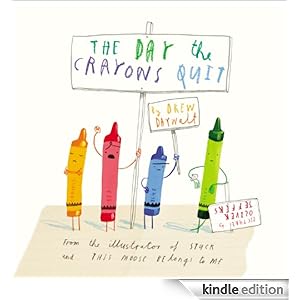
    The Day The Crayons Quit by Drew Daywalt received 29,674 votes from Texas 3rd-6th graders. It was our favorite Bluebonnet book at Glen Rose Intermediate, also.

    Watch Drew Daywalt and Oliver Jeffers acceptance speech.

    Other favorites were:


    Our students recently participated in the Bluebonnet Book Award Selection. Forty-five students were eligible to vote for their favorite book. In order to be eligible to vote, students had to read five of the twenty Bluebonnet books.

    We had a great time celebrating our hard work at the Bluebonnet Brunch.


    Links to previous newsletters

    I finally found the best way for me to share library news with you. A Blog!
    Here are all of my newsletters from the beginning of the year, all in one place in case you need to go back to one.

    Tiger Media August 14-15
    • All About Me
    • Feedly
    Tiger Media September 2014
    • Accelerated Reader
    • Evernote
    Tiger Media October 2014
    • Bluebonnet Award Nominees
    • Skitch

    Tiger Media November 2014
    • ALA Book Awards
    • What Should I Read Next?

    Tiger Media December 2014 
    • Hour of Code
    • Winter/Christmas Activities on the Web