
Showing posts with label accelerated reader. Show all posts
Showing posts with label accelerated reader. Show all posts
Monday, April 24, 2017

Wednesday, September 7, 2016
AR Tiger Teams
Let's team up and have a little reading competition! Each six weeks, the teams with the most points, highest percent correct, and most students making their goal will be honored in the library. Teams will consist of randomly placed 3rd, 4th, and 5th graders across all classes. Come to the library this week to spin the wheel and see which team you will join.
Monday, August 29, 2016
Welcome Back!
Well, we got the first week of school under our belts, and I have to say that it went pretty smoothly. Welcome back to school! I hope you had a restful summer and are ready to work hard and learn a lot this year.


Discovery Den
Our library has undergone some changes this summer to make room for the Discovery Den, a MakerSpace. The Discovery Den is a place where the students can come in and be creative. It is a work-in-progress, but the overall goal of the space is to have different activities set out at each table that allows the students to build and create and use their imaginations. Some of the activities I am planning for the year are Minecraft, Scratch Coding, arts/crafts activities, engineering challenges, and Lego building challenges. This is just the tip of the iceberg and it will evolve as we figure out what we want more or less of.
At this time, classes will be scheduling a time to visit the Discovery Den once a week during intervention time. Every student may or may not get to visit the Discovery Den every week, but it is our goal to have every student get a chance to come as often as possible.
Donations for supplies are accepted and greatly appreciated.

Library Time
In addition to Discovery Den time, Language Arts classes are scheduled to come in each week to check out books, have a lesson on library skills, or technology skills. All students are allowed to check out 2 books at a time. The teachers and I encourage students to find books that are "just right" for them. We will be talking to the students throughout the school year about finding a book that is the right level and interests them. This is a very important piece of the reading comprehension puzzle.
Accelerated Reader
After a student finishes reading a book, they will use the Accelerated Reader program to take a quiz on the book. This is usually a 5, 10, or 20 question quiz (depending on the length of the book), and it asks questions about the story to check for basic understanding. Accelerated Reader awards points for each book (depending on the length of the book). Each child will have 2 goals for each six weeks:
- a point goal - This goal is based on the student's independent reading level and is unique to each student.
- average percent correct - Students should maintain a quiz average of 85% or higher. This means that a students should score an 80, 90, or 100 on most of the quizzes they take.
I hope that you have a great school year. Please let me know if you have any questions or if I can help you in anyway. I am in the business of growing readers and want to help your child find their love of reading.
Tuesday, March 1, 2016
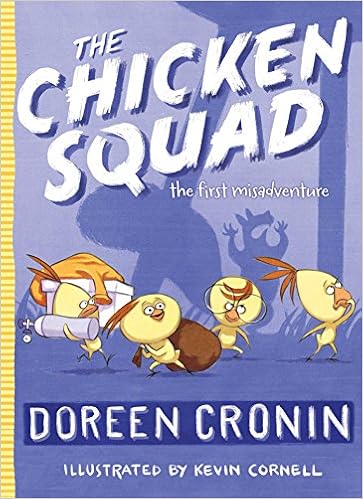
The Chicken Squad: the first misadventure
From the author of Click, Clack, Moo: Cows That Type, comes a new chapter book series about four chickens that go looking for trouble and find it. Meet Dirt, Sugar, Poppy, and Sweetie, and the retired search-and-rescue dog, J.J., as they uncover the mystery of the shiny green circle that caused the squirrel to run into the chicken coop and faint. Preview the book
The Chicken Squad: the first misadventure by Doreen Cronin (AR level: 3.3/points: 0.5)

The Chicken Squad: the first misadventure by Doreen Cronin (AR level: 3.3/points: 0.5)

Tuesday, February 16, 2016
BINGO!!!
Let's play Library BINGO! Students are encouraged to read different genres and areas of the library to get 4 or 5 in a row on their BINGO sheet. There will be a fun play day at the park in May for anyone that gets a blackout. Quizzes are valid during the 5th and 6th Six Weeks only (Feb 16-May 13).


Rules for each grade level vary. Please see the Library BINGO sheet and rules for clarification.
Classroom BINGO - A special challenge from Mrs. Mapes! Are you up to it?
Classes keep track of books read aloud by the teacher. Special class prize at the end of the school year. Remember that books logged on the classroom BINGO chart cannot be logged on the individual student charts.
Thursday, December 3, 2015
Create a Book Wish List
Your reading teachers have been very busy learning all about Accelerated Reader. I want to share one thing that kids and parents might like: creating a book wish list.
 Our presenters shared 2 great resources for finding books on a specific grade level, and I want to share these resources with you. I think you will find these to be very helpful in creating a list of books that you are interested in and that are on your reading level.

- What Kids Are Reading - Do you want to know what is popular with other kids your age? This website will show you which books are most read and tested on in AR. You can even filter the results by grade level, gender, reading level, state, type of book, and keyword.
- Click Create Lists of Popular Books
- Choose grade and click Add Filter
- To add more filters, click the plus sign in the white bar at the top next to Your Filters
- Save/Print results will give you a pdf of the top 25 books matching your search
- ARBookFind - Quickly search to see if a book has an AR test, reading level, how many points, or do an Advanced Search to find books of interest. Search by reading level, points, topics
- Click the Advanced Search tab
- Skip down to ATOS level and put in the reading range of books that you are comfortable reading
- Addtional Criteria - choose a topic and a subtopic to narrow down your genre
- Choose Fiction/Nonfiction and the language
- Sort by author, title, book level, or rating
- Go
- Print to create a pdf of the list
- GRIS Online Catalog - Look for books in our library that are on your reading level
- Click the Search tab and go to Study Programs
- Put your reading range in Minimum and Maximum Reading level boxes
- Decide how many points you would like the book to be worth (remember that for each point, the book should take 2 days to read)
- Keyword: type a topic that you would like to read about
- Search
Monday, September 28, 2015
Accelerated Reader - Weekly Diagnostic Report
Accelerated Reader has quite a few helpful reports for checking on the status of your class. One of my favorites is the Diagnostic Report.
You can find this report under:

You can find this report under:
- Accelerated Reader
- Reports
- Reading Practice
- Diagnostic - Reading Practice
- Reporting Period - Change Predefined Date Range to the current Six Weeks
- Click View Report

In the sample report, you see that there are 5 points that you should look at for all students.
- RP quizzes - tells how many quizzes a student has taken in the current marking period. You can quickly see which students have not taken a test.
- % Correct - Scan the list for students that have lower than an 85% Average. These students need to conference to determine if the books they are reading are too hard or if there is another reason why they are not passing tests. You might need to sit with these students through 1 or 2 tests and help them with the test taking procedures.
- Points - If you have set point goals for your students, you will see the percentage of their personal goal that each student has met. How to set a Goal in AR, AR Goal Calculator, & AR Goal Setting Chart, AR Goal Setting Chart AR 2000 (appears to be more lexile friendly)
- Book Level - You can also set book level goals for each student. Here you will see the average book level that they have been reading. You can check to make sure they are reading in their ZPD range.
- Diagnostic Codes - These codes will help you identify areas of weakness and conferencing topics for struggling students. A key will print on the second page of the report. Here you will also find the % of students at-risk for this class. At-risk means that a student has one or more diagnostic codes for the report period. The goal for the teacher is to have as few students with Diagnostic Codes as possible. For now, our goal is 15% or less.
Wednesday, September 16, 2015
Divide and conquer
In our library lessons we have been learning about tackling a chapter book. Some of the kids have said that the book they checked out is too long and they can't read it. We talked about a few key tips when choosing an appropriate book.

Divide and Conquer is a strategy meant to break a long chapter book into smaller, more manageable pieces. To find the number of pages you should read every day, use the following formula:

- Look at the cover
- Read the blurb
- Flip through some pages and make sure it doesn't look too intimidating or too easy
- Read a page and use the 5 finger rule to make sure it is just right.

You can get some information about the level of the book and how long it should take to read the book by looking at the AR label on the spine.
RL stands for reading level. It is an approximation of a grade level that the book would be appropriate for if the student is reading on grade level. 4.2 means 4th grade, 2nd month. It is pretty accurate, but not perfect. The student still needs to open the book and give it the 5-finger test to make sure it is a just right book.
PTS stands for points. This is the number of points the book is worth after taking an AR test. The points can also tell us how long it should take to read the book. A good rule of thumb is to double the points to determine the number of days you should read a book. This 8 point book should take no more than 16 days to read.

Divide and Conquer is a strategy meant to break a long chapter book into smaller, more manageable pieces. To find the number of pages you should read every day, use the following formula:
Total pages in book / number of days to read the book (points doubled) = pages per day
For this example, the book has 289 pages and it should take 16 days to read.
289 / 16 = 18 pages per day
Then we break the book into 18 page sections and mark them with sticky notes. Sometimes the 18th page will fall in the middle of a chapter. You may have to go forward or backward a few pages to find the beginning of a chapter or you may be able to find a natural break in the middle of a chapter (extra space between two paragraphs, or a dividing line or symbol between two paragraphs). Do this until you reach the end of the book and you have divided your book into daily reading assignments. Now you can conquer the reading.

Monday, September 7, 2015
AR Goal

At the end of each six weeks, anyone that makes their AR goal will be allowed to come to the library and shoot two free throws. Let's have some fun with this.
Let me know if you need help with goal setting. Look back at my Accelerated Reader post from early last week for more helpful info and resources.
Tuesday, September 1, 2015
Accelerated Reader
It's a new year, and it's time to set some new reading goals! I am looking forward to working with students and teachers to set reading goals and measure progress with Accelerated Reader. I want to share a few ideas about the program.
- It's not all about the points, although points are a great way to measure how much a student is reading.
- To be successful, students should be reading independently for at least 30 minutes per day.
- Every student comes to you with different skills and each requires a different goal.
- Percent correct and level are also very important indicators of a student's reading ability.
- Students respond to different types of encouragement. You may want to try several incentives in your classroom to find something for everyone. Some examples of encouragement are:
- Top Ten Readers wall (points)
- Incentives for 90-100% on quizzes
- Set 3 different goals each 6 weeks: points, level, percent
- Look in the certification levels built into AR
I love this video about why we use AR and how you can monitor your reading to become a better reader.
Since we are using the MAP test this year, you will be needing to convert Lexile levels to AR levels. Here are a few links to charts that might help you.
- http://www.thecurriculumcorner.com/wp-content/pdf/Leveling%20System%20Comparison.pdf
- http://www.theeagerteacher.com/2013/02/technology-tuesday-running-records-ipad.html
- http://lfplibrary.edublogs.org/files/2012/09/RC_books_that_are_NA_conversion_chart-riuvch.pdf
Other helpful links
- Getting Results with Accelerated Reader
- Goal Setting Calculator
- Goal Setting Chart
- My Pinterest Board For Accelerated Reader
Wednesday, February 11, 2015
Links to previous newsletters
I finally found the best way for me to share library news with you. A Blog!
Here are all of my newsletters from the beginning of the year, all in one place in case you need to go back to one.
Tiger Media August 14-15
Tiger Media November 2014
Tiger Media December 2014
Here are all of my newsletters from the beginning of the year, all in one place in case you need to go back to one.
Tiger Media August 14-15
- All About Me
- Feedly
- Accelerated Reader
- Evernote
- Bluebonnet Award Nominees
- Skitch
Tiger Media November 2014
- ALA Book Awards
- What Should I Read Next?
Tiger Media December 2014
- Hour of Code
- Winter/Christmas Activities on the Web
Subscribe to:
Posts (Atom)