
Showing posts with label professional development. Show all posts
Showing posts with label professional development. Show all posts
Monday, February 11, 2019

Monday, September 4, 2017
ClassDojo
Teachers, join the campus in creating a ClassDojo account. I think you will love it! Reward points for positive behaviors in your classroom, and share students with other teachers. Learn more ClassDojo Info

Sunday, February 19, 2017
GoogleTreks™
GoogleTreks™ 
created by Dr. Alice Christie from Arizona State University
Use Google Maps to “take” your students on adventures around the world no matter what the subject.
On this site:
- Tutorial
- Lessons for ALL subjects
- Rubrics for creating GoogleTreks™
- Rubrics for students to create their own GoogleTreks™
Other resources:
- 10 Ways to Use Google Maps in the Classroom - http://www.thethinkingstick.com/10-ways-to-use-google-maps-in-the-classroom/
- Google Lit Trips - http://www.googlelittrips.org/
- Google Street View - https://www.google.com/streetview/
- Use Street View in Google Maps - https://support.google.com/maps/answer/3093484?co=GENIE.Platform%3DDesktop&hl=en
Tuesday, February 23, 2016
Flippity
There are a lot of ideas for flashcards on the Internet, but this one appears to be very quick and easy. Flippity.net takes a Google spreadsheet and turns it into flashcards, a quiz game, a progress tracker, or a certificate of completion.

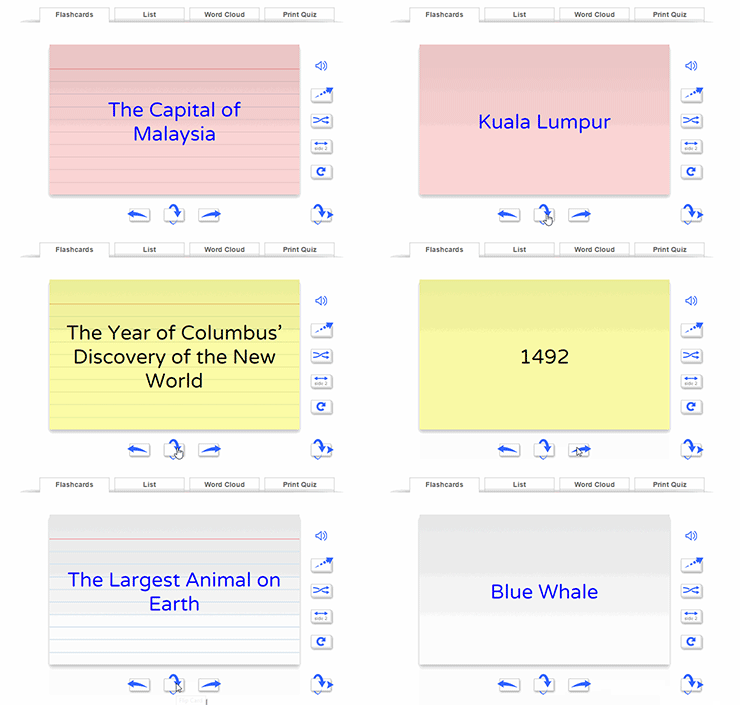
Click the link for Instructions & Templates to see how easy it is to create your own flashcards.
Wednesday, February 3, 2016
Tools You Can Use Tomorrow

Leslie Fisher is always entertaining. She is one of the must-see presenters every year at TCEA, with her "let me see how much information I can pack into an hour" attitude. I always walk away with a lot of great ideas. This year was no different. The line going into her session wrapped around the corner, and a few hundred people were turned away. We got in!!!
Here is a list of amazing tools that I think you can use tomorrow.
Tools you can use tomorrow
Tuesday, February 2, 2016
TCEA Convention

I have a schedule full of coding, robotics, and 3D printing, as well as a librarians' academy.
Location:Trinity St,Austin,United States
Friday, May 29, 2015
Professional Development Opportunities
Are you looking for some opportunities to earn comp time this summer, or maybe you are wanting to freshen up some technology skills over the summer? There are many opportunities for online professional development, and most of them are FREE.
Discovery Education (login required)
- Learn the basics of searching for content and streaming or saving for later use.
- Integrate videos and images using MovieMaker, Photo Story, green screen, and ActivBoard.
- Create assignments, quizzes, and writing prompts.
- Assign content to students

 Learning.com (login required)

- Work at your own pace on any of the ISTE Standards for Teachers
Google Apps for Education
Learn the basics of the Google Suite of Online Tools.
- Calendar
- Chrome Browser
- Docs Suite
- Docs
- Drawings
- Drive
- Forms
- Gmail
- Google Maps
- Search
- Sheets
- Sites
- Slides
- YouTube

 Renaissance Learning (AR and AR360) (create an account using your existing username and password)

Brush up on your knowledge of Reading Renaissance, monitoring reading growth and personal goal setting, or learn more about how to use AR in the classroom to encourage a culture of reading in the classroom.
Also, look for videos on AR360 and find out how to bring more nonfiction into your students' daily reading.
Tuesday, February 17, 2015
TCEA Takeaways
TCEA Takeaways
Where to begin? Evelyn, Keri, and I learned so much at TCEA, and we are so excited about using everything we learned. We even made the front page of the TCEA magazine. ;) All of the presenters have posted their handouts on the TCEA Convention website.

My biggest takeaway is Twitter. I know it is old news, but I have promised myself that I will use it every year after TCEA. I always lose interest and quit tweeting. This year, I vow to use Twitter for professional development. It is a great way to create a Personal Learning Network (PLN). In the beginning, I created a Twitter account because it's what all the cool kids were doing. Now, I see the value in following fellow educators with similar goals and interests. I have found more resources through my Twitter PLN. This week I even participated in my first TweetChat. There are many scheduled chats on Twitter. You just have to find one that interests you and follow the designated hashtag at the specified time. I participated in a Texas Librarians Chat #TXLchat and we discussed what we learned at #TCEA15.
Here are a couple of tools that will make Twitter a little easier to use:
- TweetDeck - a website that allows you to create columns of different hashtag searches that you are following
- HootSuite - organize all of your social media in one place and post on all sites at once
- FlipBoard - online platform and mobile app that organizes all social media and news into one place, giving it the look and feel of a magazine. Search for particular topics or hashtags and "flip" the results into a magazine that you can follow.
- TweetChat - enter a hashtag to begin following a chat. TweetChat organizes the discussion, allowing you to reply, retweet, or favorite.

If you're interested in learning more about Twitter for professional development, talk to me. My end goal is to create a hashtag for our campus discussions and learning.
Follow me! @sstatler
I have a lot of great sites, apps, and tools that I want to share with you, but I don't want to overload you with too much information. I plan on creating a Google Sheet to share all of our great resources. Please ask one of us if you have any questions or need some suggestions for integrating technology. I really look forward to watching our campus use technology in new ways.
Stay tuned for more TCEA goodies from Keri and Evelyn!
Subscribe to:
Posts (Atom)